Church leader quick start

Create a community that prays, celebrates, and reflects.

A practical guide to helping your leaders, small groups, and church community pray together, celebrate God’s faithfulness, and reflect on how He is moving.

11 video chapters 5 setup steps 30-day launch rhythm

The rhythm

We pray
God
moves
We celebrate
We reflect

Pray for what God will do.
Celebrate what He has done.
Reflect on His faithfulness.

99%of Groups using Living Stones feel closer to their Creator and community.*
*Based on a Living Stones survey of groups using the platform.

01 / The Practices

Three formative practices.
One shared rhythm.

Living Stones helps Christians pray, celebrate, and reflect together—not only during a weekly gathering, but throughout ordinary life.

Prayer RequestsPray

Pray unceasingly, together.

Share a request privately, with selected Tribes, or with the church. Others can add it to a Prayer List, pray through updates, and offer encouragement. When God answers, the request can become a Stone.

Philippians 4:6 · James 5:16 · Galatians 6:2 · Acts 2:42

StonesCelebrate

Celebrate the story of His faithfulness.

A Stone in Living Stones is what Ebenezers are in the Bible—monuments to God’s provision, an answered prayer, a changed heart, or peace in a difficult season. Over time, these captured moments become a personal and communal record of what God has done, fueling the faith and hope of many.

Joshua 4 · 1 Samuel 7:12 · 1 Peter 2:5 · Psalm 78:4–7

Daily Rewind + Month in ReviewReflect

Go deeper with God.

Daily Rewind brings one of your Stones back into view and guides you through Scripture and personal reflection. Month in Review gathers the prayers, people, themes, and Stones that shaped the month so individuals and communities can reflect on the larger story of how God is moving.

Psalm 77:11–12 · Luke 2:19 · Psalm 139:23–24 · James 1:22–25

02 / Overview

See the rhythm
inside the app.

Start with the vision, then move through four guided tours. Watch straight through or choose the chapter that is most useful right now.

Welcome2:22

A word for church leaders

Begin with the vision behind this guide and the role leaders play in helping a new spiritual rhythm take root.

03 / Set up

Set up your church
in five steps.

Start with the leadership structure, then invite people into the communities where day-to-day discipleship already happens.

Church setup1:10

Before you begin

A short introduction to the church setup process and the decisions you will make as a leader.

01

Create your account

Download Living Stones and create an account. The person whose claim is approved (see step 2) becomes the church Owner, though ownership can be transferred later.

Leader first: Before you invite anyone, share one Prayer Request, place one Stone, and spend a few minutes reflecting on it yourself. This ensures the community doesn’t land on a blank page and models all three practices for your team.

02

Find and claim your church

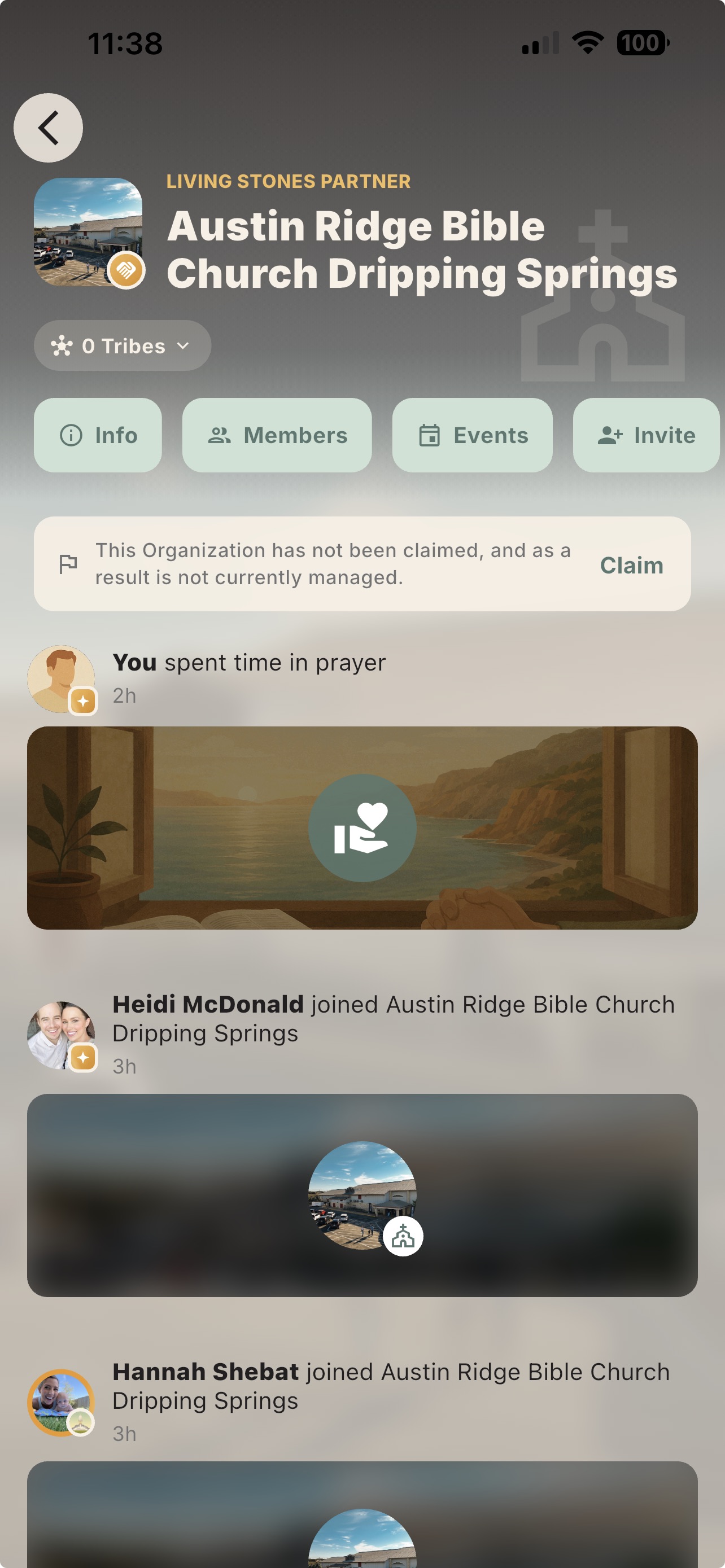
Open Communities → Organizations → Find your church. Join the church, open its page, tap Claim, and submit the request. We personally verify each claim before unlocking leadership tools.

Good to know: Not listed? Choose “Request an organization” from the search screen.

An unclaimed church page in Living Stones with the Claim action visible
Find your church, join it, and submit a claim to unlock leadership tools.
03

Choose who can join

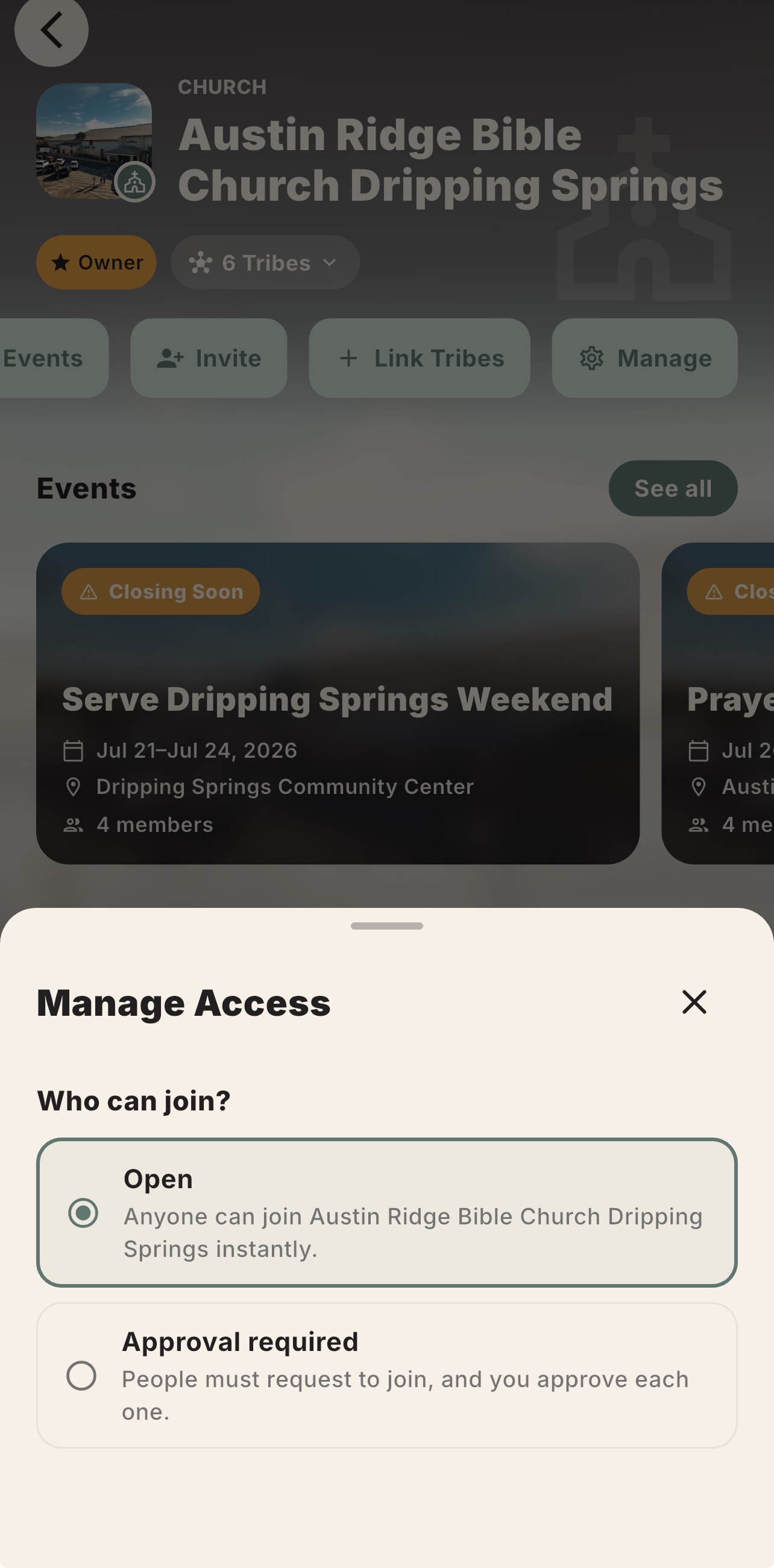
From the church page, open Manage → Manage Access. Choose Open for instant joining, or Approval required when an Owner or Admin should approve each request.

Good to know: Most churches begin with Open, but choose what best fits your community.

The Manage Access screen showing Open and Approval required options
Choose whether people join immediately or request approval from a leader.
04

Create and connect your Tribes

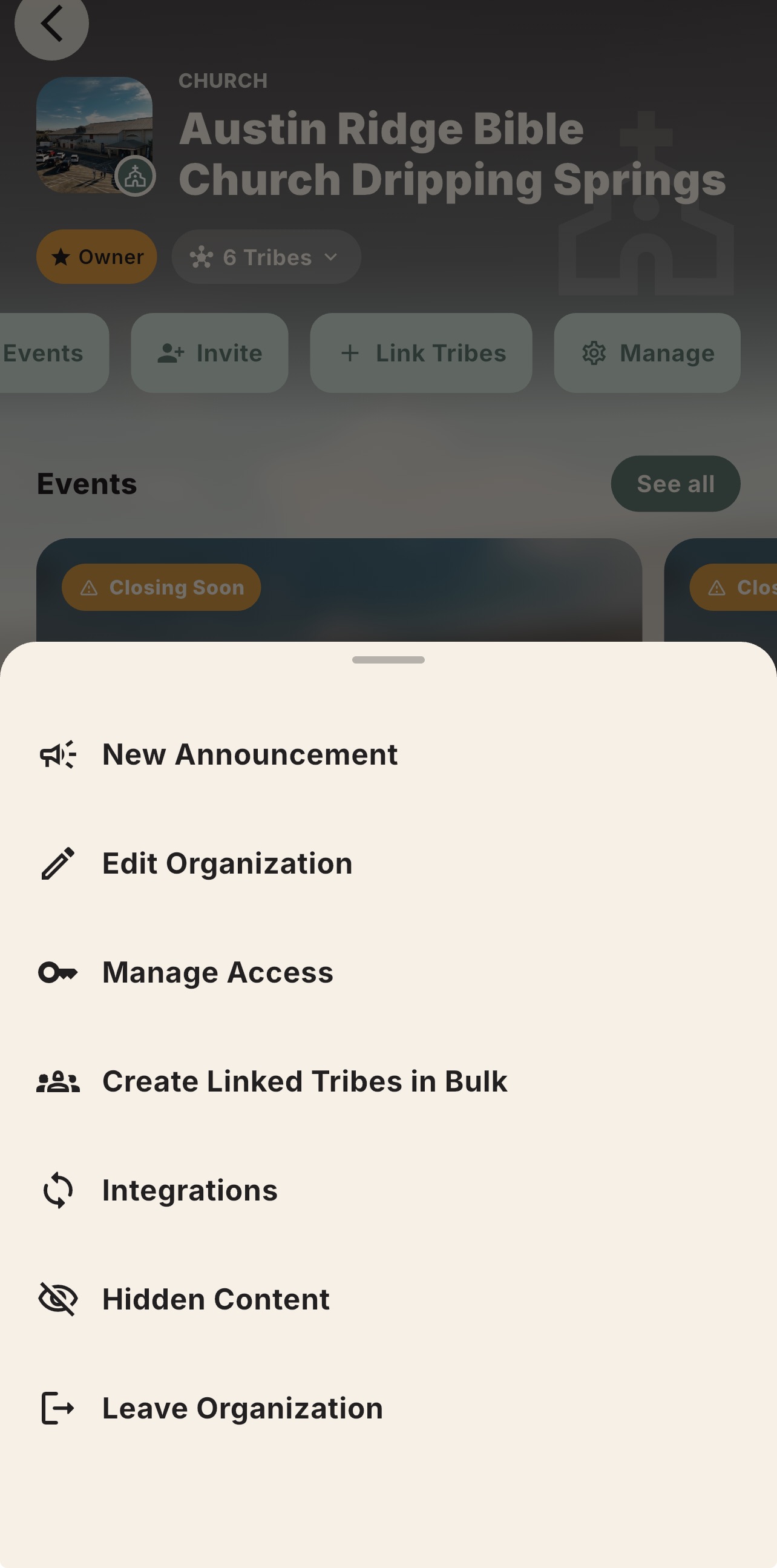
Tribes are your small groups, Bible studies, ministry teams, student groups, and staff circles. Create several at once with Create Linked Tribes in Bulk, create them manually, or link Tribes that already exist.

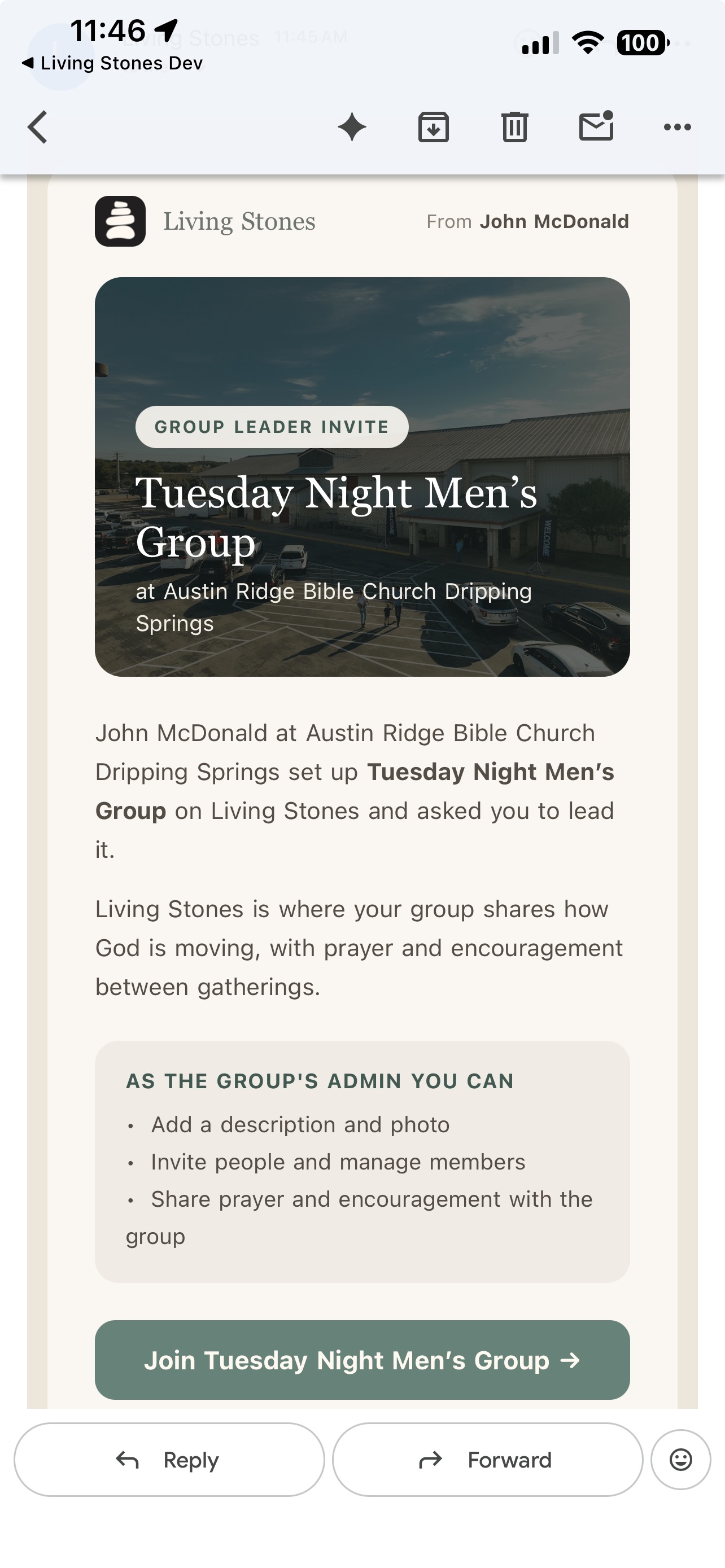
Good to know: In bulk setup, add a leader email after each group name to invite that leader as a Tribe Admin.

Church management menu with Create Linked Tribes in Bulk visible
A group leader invitation email generated by Living Stones
Create linked Tribes in bulk, then invite leaders into the groups they will administer.
05

Share administration

Open Members, select a trusted leader, and choose Make Admin. Church Admins can manage members, announcements, integrations, hidden content, and Insights. Tribe Owners can appoint Tribe Admins the same way.

Good to know: Only the Owner can transfer ownership or change the Admin roster.

04 / Lead

The tools your
leaders will use.

Church Owners and Admins can access these organization-level features. Tribe Owners and Admins can also create announcements within their Tribes.

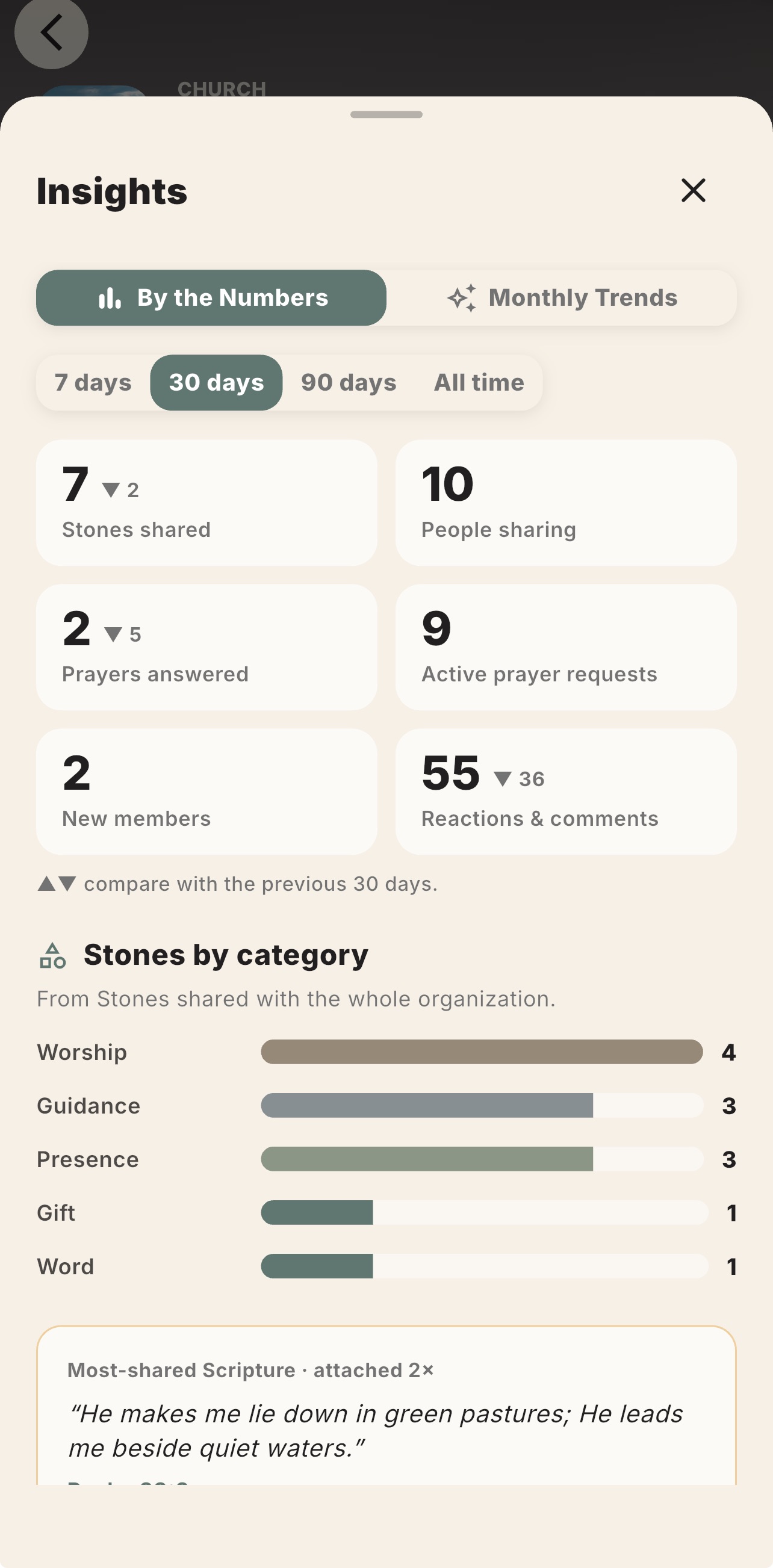
Living Stones organization Insights showing participation and prayer activity
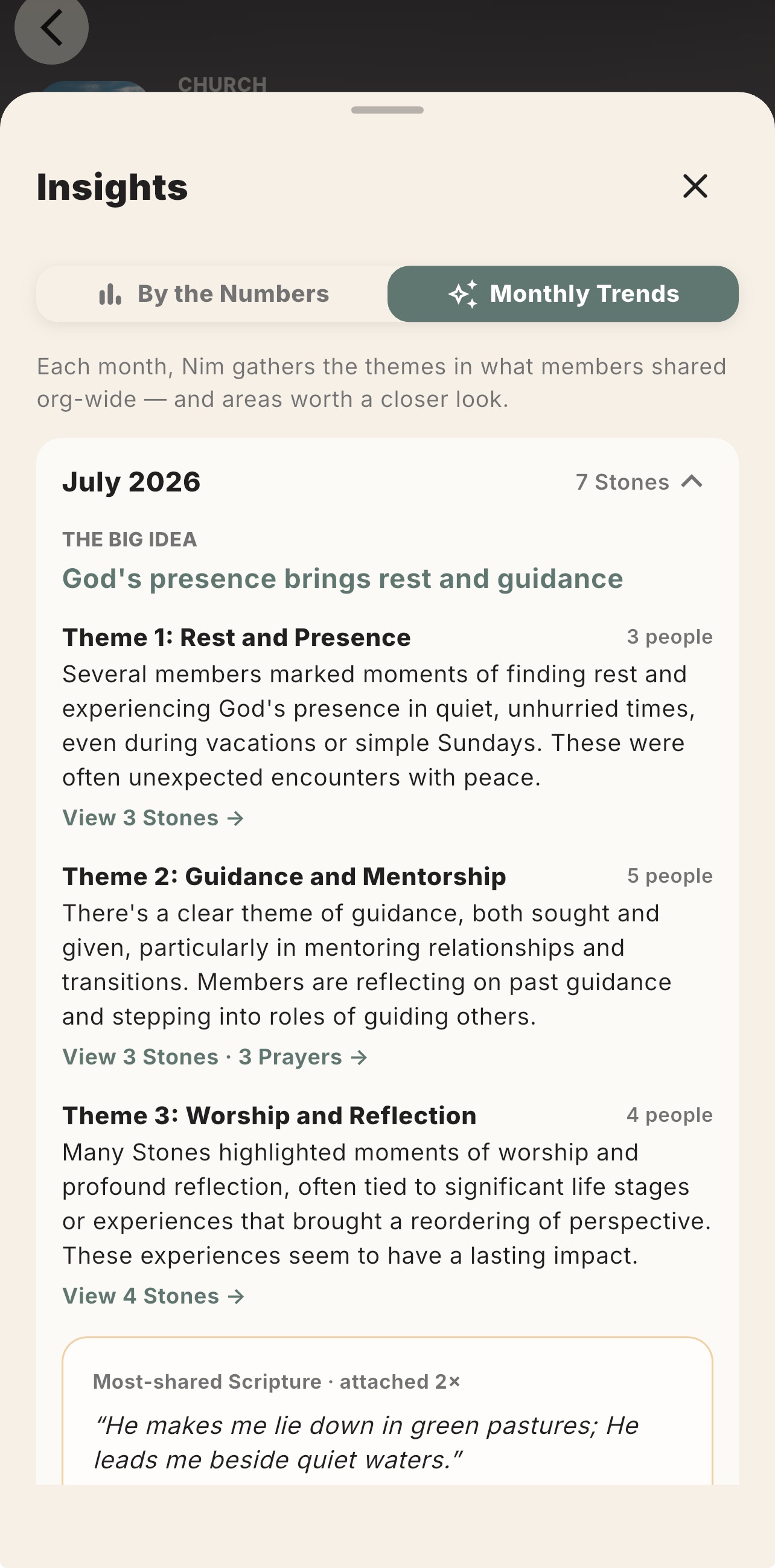
Living Stones Monthly Trends showing themes across a church
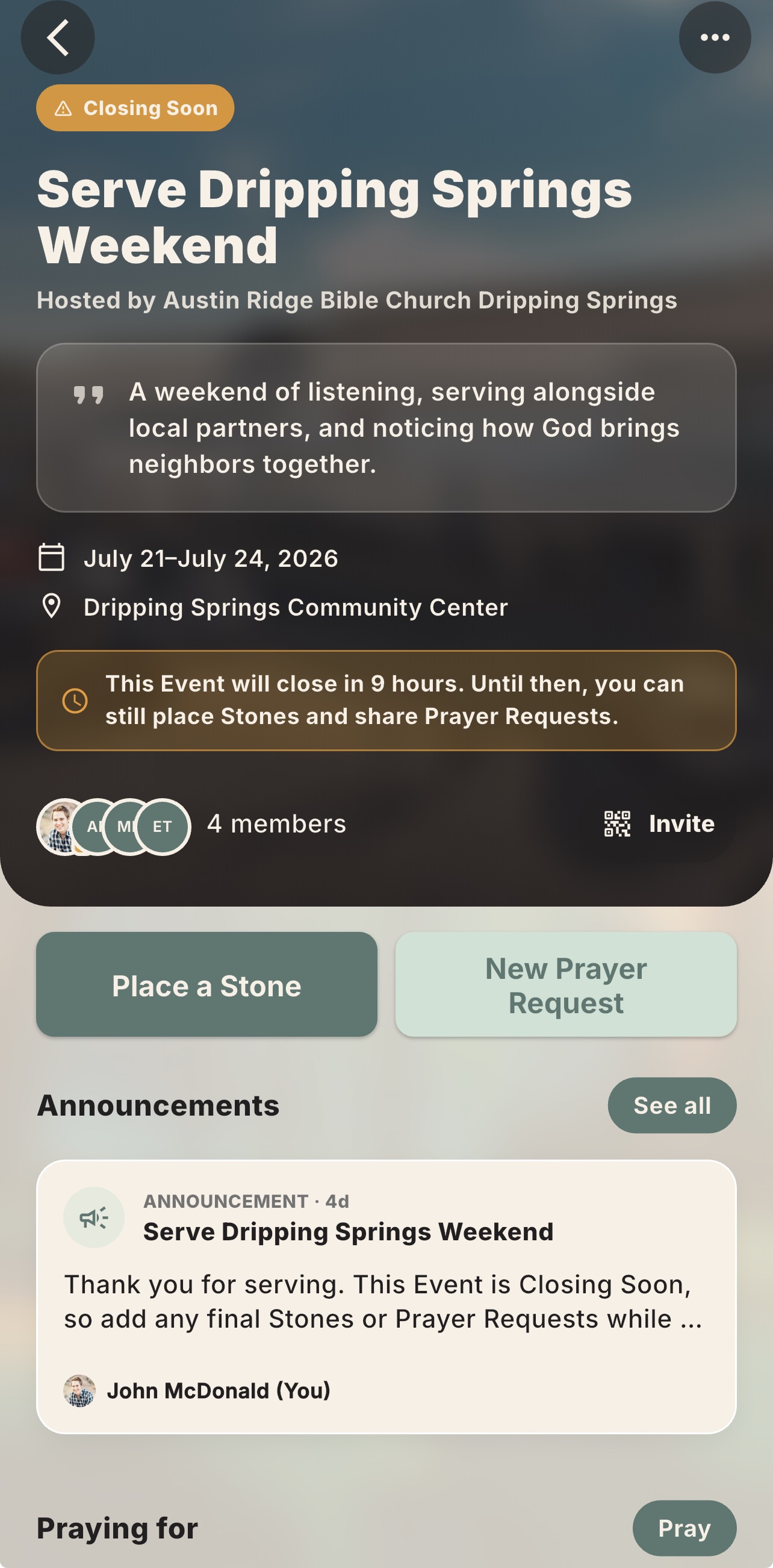
A church Event in Living Stones with prayer, Stone, and announcement tools
Your church page brings Insights, Events, invitations, announcements, moderation, and integrations together.

Church tools9:12

Lead and support your community

See the organization-level tools that help church leaders communicate, listen, moderate, and understand participation.

01

Hidden Content

Hide a Stone or Prayer Request from the church feed without deleting the author’s content. Review or restore it from Manage → Hidden Content.

02

Insights

See participation, Stones, prayer activity, active requests, and Tribe-level activity. Monthly Trends adds themes, Scripture references, and potential teaching opportunities.

03

Announcements

Send a prominent update to the whole church or selected Tribes. Use it for prayer gatherings, serving opportunities, reminders, and ministry updates.

04

Events

Create a focused community for a retreat, mission trip, conference, or prayer night. Invite by link or QR code, then preserve a recap of prayers, themes, and stories.

05

Planning Center

Match existing members and add new people to Planning Center. Preview the sync first and optionally route new members into a follow-up Workflow.

A note on Insights: use them as a listening aid, not a complete picture of the congregation. Patterns can prompt better questions; they never replace pastoral judgment or personal care.

05 / Launch

A simple 30-day rhythm.

Keep the first month focused. One small practice each week is enough to help the rhythm take hold.

30-day launch5:26

Help the rhythm take root

A practical approach to the first month that keeps the invitation clear, simple, and sustainable.

0

Before launch

Claim the church, choose access, create the first Tribes, and appoint Admins. Ask each leader to share one Prayer Request, place one Stone, and reflect on what God has shown them.

1

Week 1

Begin with one honest prayer. Add another person’s request to your Prayer List and pray through it during the week.

2

Week 2

Celebrate one small thing. Place a Stone without waiting for a dramatic story—many Stones are a single sentence at first. The more you notice and capture His still small voice, the easier it is to hear the next time.

3

Week 3

Reflect on what God is showing you. Complete a Daily Rewind and invite leaders to share one insight with their Tribe. Let yesterday’s testimony shape today’s discipleship.

4

Week 4

Practice the full rhythm together. Pray for what God will do, celebrate answered prayers with Stones, and review Insights to reflect on the broader themes of how God is working in your community.

Keep going

The goal is not more content.

The goal is a church that becomes more attentive to God, more faithful in prayer, more ready to celebrate His work, and more practiced at reflecting on His faithfulness together.

Start small. Let leaders model the way. Keep returning to the prayers, Stones, and reflections your community shares.

Questions? Email John

A final word0:35

Keep returning to the rhythm

A brief encouragement as your community begins to pray, celebrate, and reflect together.